

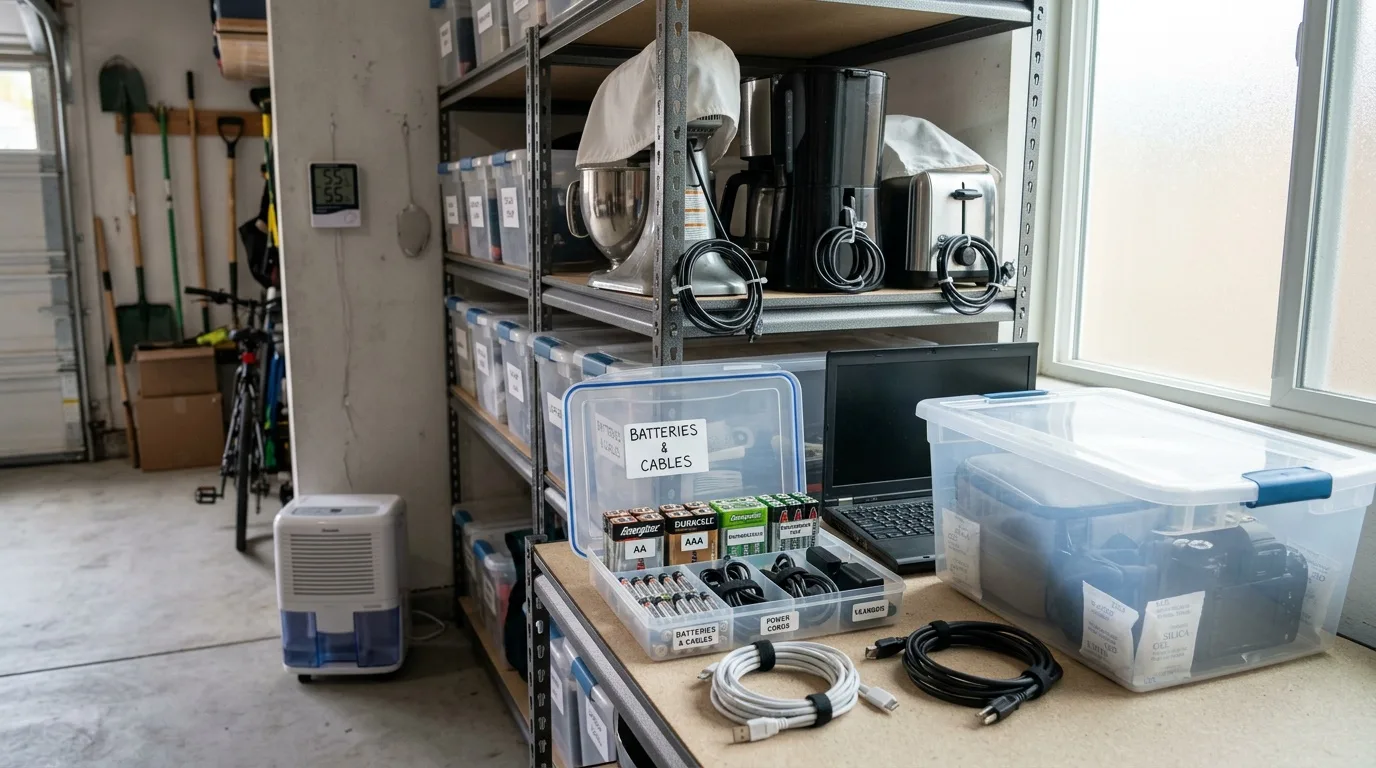
Why Moisture Is the Main Enemy of Stored Equipment
Expensive household electronics and appliances demand proper storage conditions. Humidity inside a device's housing promotes corrosion, oxidation of electrical contacts, and outright failure of circuit boards. This matters especially during extended periods of non-use — whether you are renovating a home in Solana Beach, moving between residences, or simply putting seasonal gear away for a few months.
Condensation forms as a result of temperature swings. During the day a garage or storage unit warms up; at night the air cools. The air trapped inside an appliance's housing cools along with it, and moisture appears on internal surfaces. In unheated or poorly insulated spaces the process intensifies considerably.
The most vulnerable components include circuit boards in televisions and audio equipment, compressor assemblies in refrigerators, electromagnetic valves in washing machines, and lithium batteries in laptops and tablets. Ignoring the problem leads to corroded contacts, damaged bearings, and cracked seals. So the protective steps need to happen before you put anything into storage — not after you notice the damage.
How to Protect Electronics from Condensation
Competent storage organization requires a systematic approach. The main methods boil down to a short list:
- Stabilize the temperature — avoid sharp swings between day and night.
- Use moisture absorbers and silica gel packets inside housings or next to devices.
- Cover equipment with ventilated fabric covers, not sealed plastic film. A fully sealed wrap actually traps moisture and makes condensation worse.
- Dry every device thoroughly before putting it away.
Before storage, clean the equipment of any dirt or dust, then let it dry completely. For metal parts — hinges, brackets, exposed screws — an anti-corrosion spray adds another layer of protection. If you are storing items in a Solana Beach garage that lacks climate control, placing a small dehumidifier or even a bucket of moisture-absorbing granules nearby can make a real difference. It applies equally to homes in nearby Encinitas.
Preparing Major Appliances for Storage
Refrigerators and Freezers
Disconnect the refrigerator from the outlet and defrost it completely. If the model has an automatic defrost function, use it. After defrosting, drain the water from the condensation tray behind the rear wall, wash all interior walls and door surfaces with a mild detergent, then wipe everything bone-dry.
The rubber seals and gaskets must also be perfectly dry — if moisture remains and temperatures drop, the rubber can crack. Leave the doors slightly ajar to allow air circulation inside and prevent stale odors or mold.
Never leave a refrigerator running in an unheated space. Operating below about 40°F risks compressor damage because the refrigerant becomes highly viscous in the oil at low temperatures, increasing wear on the motor.
Washing Machines
Inside a washing machine there is almost always residual water — in the valves, drain chambers, hoses, and the corrugated tubes behind the drum. Before storage you need to drain it as completely as possible.
Most models have a drain valve under a filter cover at the base. Tilt the machine toward the drain point if needed. Disconnect the water inlet hose, run a brief cycle to open the valve, and ideally blow air through the inlet opening for three to five minutes with a compressor or even a shop vac set to blow. Wipe the drum dry.
If there is any chance of freezing temperatures, pour about two cups of glycerin or RV antifreeze inside to convert the residual water in the hoses and corrugated tubes into a non-freezing solution. Run a spin cycle to distribute the liquid through the drainage system, then disconnect from power.
Leave the door and detergent drawer open for air circulation. When you start the machine again after storage, remove the drain filter first, empty any residual solution, reconnect the water supply, and run one or two empty cycles before normal use.
Dishwashers
Drain all water first. Most models allow quick drainage through the inlet tube and water valve. Complete removal of water from internal reservoirs is often impossible, though. One workaround: fill the salt compartment fully, add detergent to the tablet compartment, run a maximum-temperature cycle with a concentrated salt solution. The resulting brine has a much lower freezing point — down to about -6°F. Disconnect the inlet hose, run a short cycle to open the valve and blow out remaining water, then lay the hose flat. Leave the door slightly open.
How to Store Batteries and Devices with Built-In Accumulators
Protect batteries from heat and moisture. Sharp temperature swings, overheating above 104°F, and freezing below -13°F all damage battery cells. Li-Ion and Li-Pol batteries lose functional capacity when held at or below freezing for extended periods.
Storing phones, tablets, or laptops in places with high ambient temperatures is not recommended. Heat shortens the lifespan of electronic components, causes defects in the battery, and can even deform plastic housings. Batteries will not charge properly at temperatures above 104°F.
Charge Level for Long-Term Storage
A battery left in storage gradually self-discharges. A deeply discharged lithium battery is almost certainly ruined — once the voltage drops below about 3V the cell becomes unrecoverable. If you do not plan to use a device for a week or more, charge the battery to about 60%, remove it from the device if possible, and store it separately in a dry, cool place.
For lithium batteries (Li-Ion, Li-Pol), recharge once every few months to prevent deep self-discharge. For older nickel-metal-hydride (Ni-MH) batteries, run a full discharge-and-charge cycle every six months.
Contact Protection
Battery contacts need protection from touching metal objects or surfaces. The contact group on a mobile device is a common cause of accelerated self-discharge. Use the original protective caps or wrap contacts with a small piece of electrical tape before storing loose batteries.
Never attempt to disassemble a battery at home. Repairing modern sealed cells in a home workshop is not feasible and creates a fire hazard.
Organizing Cables, Chargers, and Accessories
Modern gadgets require constant recharging. Over time cables accumulate in surprising quantities, and even two cords placed next to each other will inevitably tangle so badly that untangling them becomes a project in itself.
Storage in Compartmentalized Boxes
The most universal method is a box — cardboard or plastic — with the interior divided into sections using strips of cardboard or small dividers. Assign each cable or charger its own slot and label the sections. Without dividers, the cables will tangle within days regardless of how neatly you coiled them.
DIY Organizers
Cardboard or plastic tubes — even toilet paper rolls — work well as individual cable holders. Glue several together, stand them upright in a box, and slip a coiled cable into each one. For a neater look, wrap each tube in colored paper or masking tape with a label.
Another option: small yogurt cups glued flat-side-down into a box. Each cup holds one coiled cable or charger brick. Simple, free, and surprisingly effective.
For anyone who sews, a fabric wall organizer with pockets can be hung on the inside of a closet door or on a garage wall, freeing up shelf and drawer space entirely.
Desk Cable Management
Binder clips clamped to the edge of a desk keep frequently used cables from falling behind the furniture. The solution is purely functional — not pretty, but it works. For a cleaner look, silicone cable holders with adhesive backing attach to wood, glass, metal, or plastic and hold three to seven cables each without damaging the cord's insulation.
Labeling
Group cables by type: all USB-C in one section, HDMI in another, laptop chargers separately. A budget labeling trick is wrapping each cord near the plug with a small strip of colored tape or a self-adhesive tab — bread-bag clips work surprisingly well for this. When you need a specific cable, the color or label saves you from pulling out every cord in the box.
A Few Final Notes for Solana Beach Residents
Coastal humidity along the Solana Beach shoreline sits higher than in inland neighborhoods, so moisture-absorbing packets and dehumidifiers are not optional extras — they are basic necessities for any garage or storage unit holding electronics. Check stored devices every couple of months: top up battery charge levels, inspect cable insulation for cracking, and replace spent silica gel packets. If an appliance has been sitting in a cold garage or storage container, let it warm to room temperature for at least several hours — ideally overnight — before plugging it in. The temperature contrast creates condensation on internal circuit boards, and powering on a damp device is how short circuits happen. Coastal garages in nearby Del Mar homes need the same precautions.
Storage is the calm case; after a kitchen fire, our Solana Beach guide on what to save first covers the urgent one. The same storage advice fits homes in nearby Rancho Santa Fe.